
Most conversations about self-hosted LLMs start with GPUs: which card, how much VRAM, which inference server. But there is a whole class of tasks where a GPU is overkill: classifying support tickets, extracting a few fields from text, routing requests, generating short replies in an internal tool. For those, a small model on an ordinary CPU server can be enough, and it costs as much as the cheapest VPS.
To check how this works in practice, we built a minimal service: local-inference-x86-05b. It runs Qwen2.5-0.5B-Instruct on PyTorch without a GPU, exposes a chat API through FastAPI and ships as a single linux/amd64 Docker image that works fully offline. This article walks through the design decisions, shows real numbers from a test server and lists honestly what is not ready for production yet.
Why a 0.5B model on a CPU
Qwen2.5-0.5B-Instruct has about 0.5 billion parameters, supports a long context and is released under the Apache 2.0 licence, so it can be used commercially. That is two orders of magnitude smaller than the models behind ChatGPT or Claude, and it shows: a model this size does not know much about the world and reasons poorly. What it does reasonably well is follow simple instructions on text you give it.
A CPU deployment makes sense when:
- Data must not leave your perimeter. Personal data, contracts, internal tickets: a local model removes the question of transferring data to a third-party provider (see our article on LLMs and GDPR).
- The environment is offline or isolated. Factory networks, on-premise installations at a client, air-gapped segments.
- The load is low and predictable. Tens or hundreds of requests per hour, not thousands per minute.
- You need a cheap stand-in for an LLM API in development, tests or demos.
If you need high throughput or larger models, look at GPU servers such as vLLM; we compared the options in the guide to self-hosting LLMs.
Architecture in one picture
The project is deliberately small: two Python files, a Dockerfile and a CI workflow.
local-inference-x86-05b/
├── app/
│   ├── model.py      # loads the model, generate() and stream()
│   └── main.py       # FastAPI: GET /health, POST /chat
├── Dockerfile        # multi-stage: deps → model → runtime
├── pyproject.toml    # dependencies, CPU-only PyTorch index
└── .github/workflows/docker.yml   # build and push to GHCR
The request path is straightforward: FastAPI validates the JSON body, the model's chat template turns the list of messages into a prompt, transformers generates tokens on the CPU, and the response is returned either as a single JSON object or as a Server-Sent Events stream.
Docker image: offline, small and non-root
The Dockerfile has three stages, and each one solves a specific problem.
1. CPU-only PyTorch. The default PyTorch wheel on Linux pulls in CUDA libraries that weigh gigabytes. A CPU server does not need them, so pyproject.toml points uv to the dedicated CPU index:
[tool.uv.sources]
torch = [{ index = "pytorch-cpu" }]

[[tool.uv.index]]
name = "pytorch-cpu"
url = "https://download.pytorch.org/whl/cpu"
explicit = true
Dependencies are installed with uv sync --frozen from the lock file, with a BuildKit cache mount, so rebuilds after code changes take seconds.
2. Weights baked into the image. A separate stage downloads the model from Hugging Face at build time, keeping only the files needed for inference:
FROM deps AS model
ARG MODEL_ID=Qwen/Qwen2.5-0.5B-Instruct
RUN /opt/venv/bin/python -c "from huggingface_hub import snapshot_download; \
snapshot_download('${MODEL_ID}', local_dir='/models/model', \
allow_patterns=['*.json', '*.safetensors', '*.txt', '*.model', 'merges.txt'])"
The runtime stage sets HF_HUB_OFFLINE=1 and TRANSFORMERS_OFFLINE=1. The container never goes to the internet: it starts in a closed network, does not depend on Hugging Face availability, and the image tag pins an exact version of the weights. That makes deployments reproducible: the same tag means the same model. The MODEL_ID build argument lets you bake in another model without changing code, for example Qwen/Qwen2.5-Coder-0.5B-Instruct.
3. Minimal runtime. The final image contains only python:3.12-slim, the virtual environment, the weights and the application code. The process runs as an unprivileged app user, and the HEALTHCHECK polls /health with a 60-second start period, enough for the model to load into memory.
API: a familiar chat format
The service exposes two endpoints. GET /health returns the status and the model in use. POST /chat accepts a message list in the format everyone knows from OpenAI and Anthropic APIs:
{
  "messages": [
    {"role": "system", "content": "You are a helpful assistant."},
    {"role": "user", "content": "hello what are you the model?"}
  ],
  "max_new_tokens": 256,
  "temperature": 0.7
}
Pydantic validates the request: at least one message, roles limited to system, user and assistant, max_new_tokens from 1 to 2048, temperature from 0 to 2. Setting temperature: 0 switches to greedy decoding, which is useful for extraction and classification where you want deterministic output. Swagger UI is available at /docs.
Here is the same request sent to the service deployed on our test server:
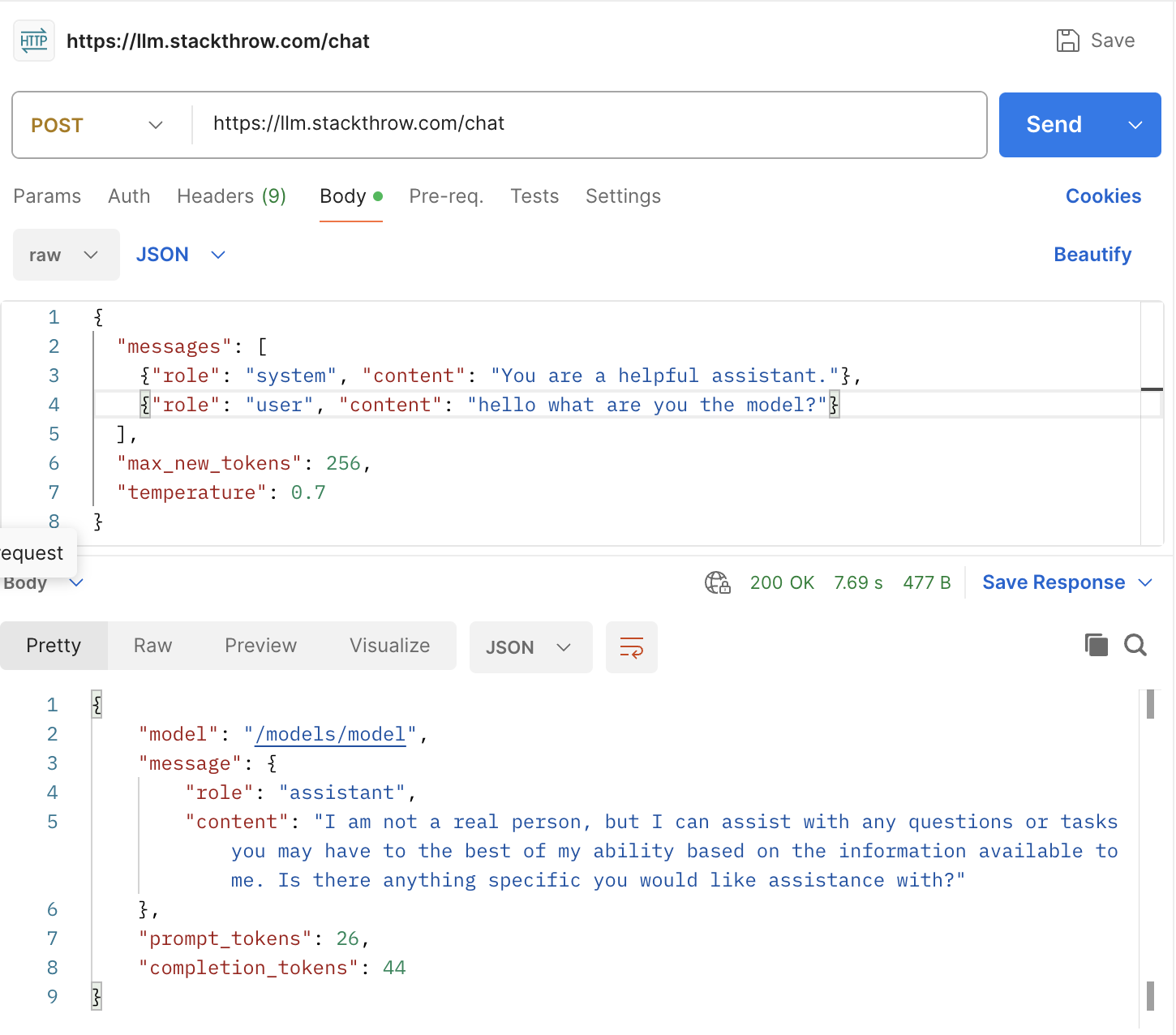
Two things are worth noticing. First, speed: 44 tokens in 7.69 seconds, including the network round trip, is roughly 5–6 tokens per second end to end on a modest virtual server. That is fine for background jobs and short answers, but a 500-token answer would take more than a minute, so for interactive interfaces you need streaming. Second, quality: asked "what model are you?", the model gave a generic answer and did not name itself. That is typical for a 0.5B model. If identity or tone matters, put it in the system prompt explicitly, and do not rely on the model's own knowledge of facts.
The response also includes prompt_tokens and completion_tokens, which is handy for logging and capacity planning even when tokens cost nothing.
Streaming over SSE
With "stream": true the service returns text/event-stream: chunks of the form data: {"content": "..."} and a final data: [DONE]:
curl -N localhost:8000/chat -H 'content-type: application/json' -d '{
  "messages": [{"role": "user", "content": "Write a haiku about Docker"}],
  "stream": true
}'
Under the hood, generation runs in a separate thread, and TextIteratorStreamer from transformers hands decoded text to the FastAPI generator as it appears:
def stream(self, messages, max_new_tokens, temperature, top_p):
    kwargs = self._prepare(messages, max_new_tokens, temperature, top_p)
    streamer = TextIteratorStreamer(self.tokenizer, skip_prompt=True, skip_special_tokens=True)

    def run() -> None:
        with self._lock, torch.inference_mode():
            self.model.generate(**kwargs, streamer=streamer)

    thread = threading.Thread(target=run, daemon=True)
    thread.start()
    for chunk in streamer:
        if chunk:
            yield chunk
    thread.join()
The user sees the first words within a fraction of a second instead of waiting for the full answer. How to consume such a stream on the frontend is covered in our article about AI chat in Next.js with streaming.
Concurrency: one generation at a time, on purpose
The most important line in model.py is easy to miss:
# CPU generation is compute-bound; running requests in parallel only slows each of them down.
self._lock = threading.Lock()
On a GPU, inference servers batch requests and serve dozens in parallel. On a CPU, a single generation already uses the available cores for matrix multiplications. Two parallel generations compete for the same cores and memory bandwidth: each one runs roughly twice as slow, and the total time does not improve. So the service runs requests strictly one after another, and the rest wait for the lock.
The rest of the code is built so the waiting does not block the server: the non-streaming request runs through run_in_threadpool, and the streaming generator is a sync generator that FastAPI also iterates in a thread pool. /health keeps answering while a long generation is in progress, so the orchestrator does not restart a container that is merely busy.
Two more CPU-specific details:
- The model is loaded in
float32. The weights on Hugging Face are stored in bf16, but many x86 processors have no fast bf16 arithmetic, and float32 is the safe default. The price is memory, which we see below. - The
TORCH_NUM_THREADSvariable limits the number of threads. This is useful if the container shares a server with other services, or if the cgroup CPU limit is lower than the number of cores PyTorch sees.
What the server sees
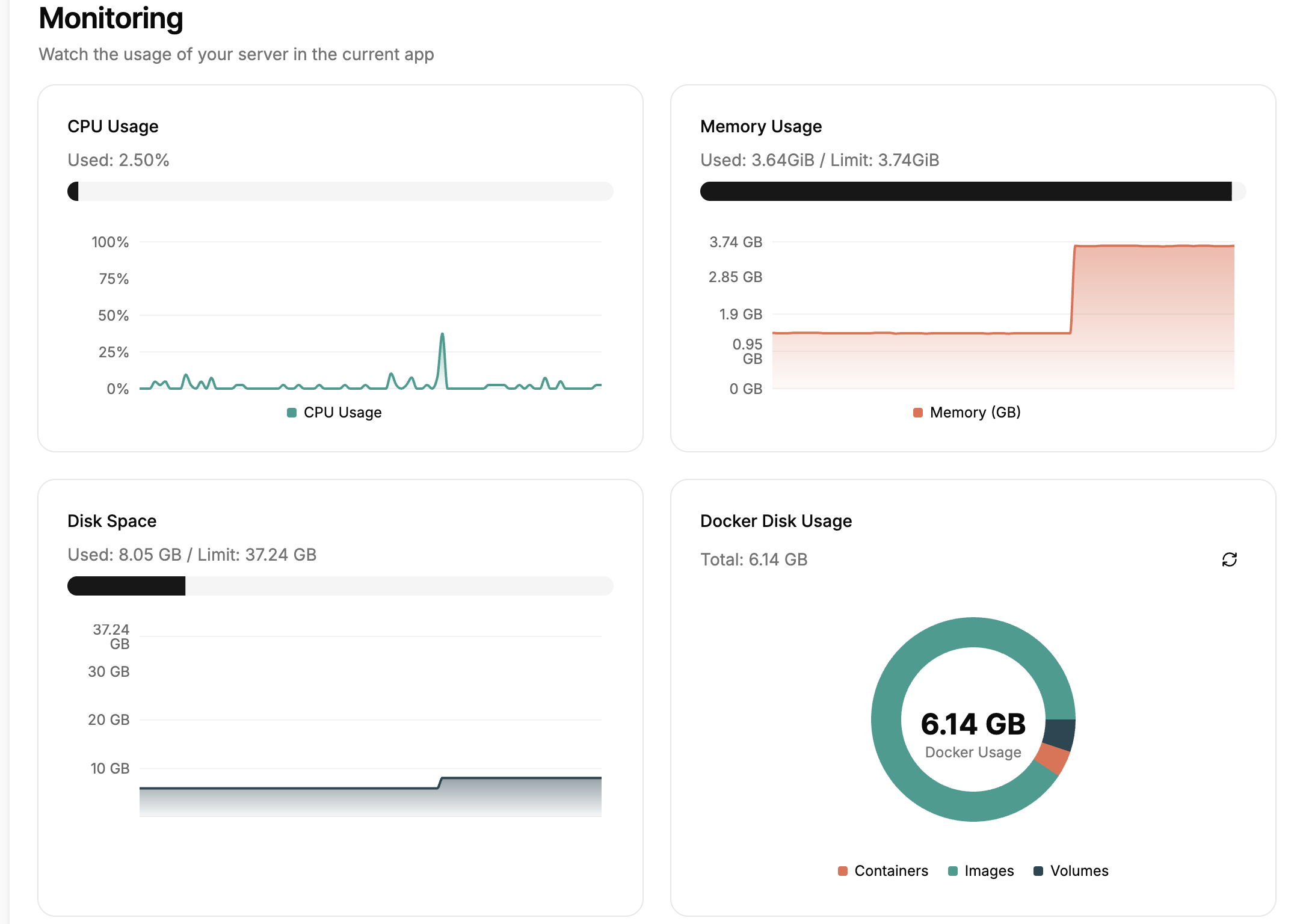
Here is the monitoring dashboard of the test server where the container runs:
What it tells us:
- CPU is idle between requests. 2.5% at rest, and short spikes during generation. The dashboard averages over its sampling interval, so a few seconds at full load look like a narrow peak. The pattern itself is correct: the CPU works only while generating.
- Memory is the bottleneck. The graph covers the whole server. After the container started, usage jumped by roughly 2.5 GB and stayed at 3.64 of 3.74 GiB. That matches the arithmetic: 0.5 billion parameters × 4 bytes in float32 is about 2 GB of weights, plus PyTorch, the tokenizer and buffers. On a 4 GB server there is almost no headroom left, and the next service may get killed by the OOM killer.
- Disk is not a problem. Docker takes 6.14 GB, most of it images. CPU-only PyTorch and a compact set of weights keep the size manageable.
Practical conclusion: for this model, plan for at least 4 GB of RAM dedicated to the container, set an explicit --memory limit, and if you need to save memory, look at bf16 on CPUs that support it (AVX-512 BF16, AMX) or at quantized GGUF models with llama.cpp, where a 0.5B model takes a few hundred megabytes.
Build and publish in CI
The GitHub Actions workflow builds the image on every push and pull request. On pushes to main/master and on v* tags, it pushes the image to GitHub Container Registry with tags for the branch, semver, commit SHA and latest. The build uses the GitHub Actions cache via cache-from/cache-to: type=gha, so the heavy layers with PyTorch and weights are not rebuilt every time.
Running it takes one command:
docker run --rm -p 8000:8000 --memory 4g \
  ghcr.io/stackthrower/local-inference-x86-05b:latest
Or without Docker, for local development:
uv sync
uv run uvicorn app.main:app --port 8000
What is missing before production
The project is a working base, not a finished product. Before exposing it to real users, we would add:
- Authentication. The API is open. At minimum, an API key in a header or a reverse proxy with authentication in front of it.
- A queue limit and timeouts. Requests wait for the lock indefinitely. Under load, it is better to return
429or503immediately than to accumulate a queue of requests whose clients have already disconnected. - Cancellation on client disconnect. If a streaming client drops, the generation thread keeps running until
max_new_tokensand holds the lock. Checkingrequest.is_disconnected()and stopping generation viaStoppingCriteriasolves this. - Metrics. Generation time, tokens per second, queue length. Without them, it is impossible to know when it is time to scale. More on this in our article about LLM observability.
- Quality evaluation for your task. Before relying on a 0.5B model, run it on a set of real examples from your domain. Our guide to LLM evals describes how.
- A readable model name in the response. The
modelfield now returns the file path/models/model; it is better to return the original model ID.
When to choose this approach
A small model on a CPU is a good fit when the task is narrow, the data is sensitive, the load is low and the budget is limited. For structured tasks, combine it with strict output formats and validation, as described in the article about structured outputs. If quality is not enough, the next step is not necessarily a GPU: first try a slightly larger model (1.5B–3B) in a quantized format, which still runs on a CPU.
The code is open: github.com/StackThrower/local-inference-x86-05b. If you are deciding whether to run models in-house or use an API, or need help taking such a service to production, get in touch.